It’s been quite awhile since I’d done anything like this - I’ve been very very busy working on HueForge (both a bugfix build for 0.9.4.2 and a much bigger update build in 0.9.5 which will be the first beta release in quite some time given how big it is and how much it changes). I also have some exciting ColorDrop changes coming in the near future, though I’m not ready to comment on them yet.
Website Changes
Buying and downloading on the HueForge shop has never been ideal. The download links are hard to find and with annual commercial licenses, or upgrades from personal to commercial (not to mention Plugin orders), users get multiple order numbers to pick through. I’ve been working on a unified download page. A download button will automatically load on the store page if you are logged in and have orders under your account. That download button will take you to a page with all of your orders on it.
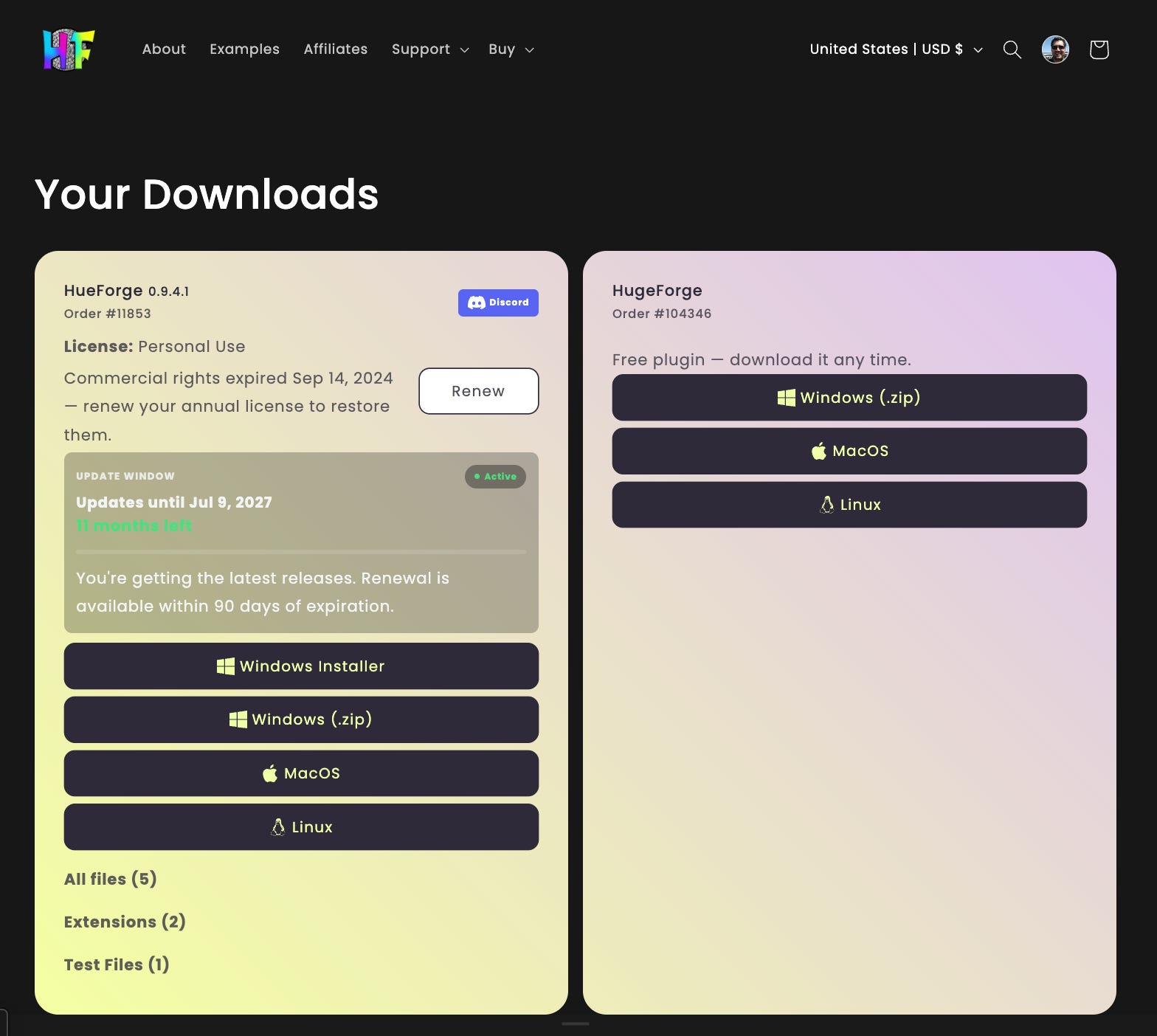
Let’s get the “bad news” out of the way. You can see the “Update Window” listing on this screenshot. Yes, I’m finally going to be cutting off maintenance updates for users more than 2 years past their most recent purchase date. This has always been in the terms since the very beginning, but I didn’t have the infrastructure to give users access to their last authorized version. Cutting off users without access to redownload their last authorized build was not acceptable. I will be giving everyone access to 0.9.4.x through this interface, my earliest supporters will not be penalized and set back to whatever their 2 year expiration build was.
UPDATE: 1st Party Plugin purchases (at this time ColorDrop and FlatForge) now provide a 1 time, 6 month extension to your maintenance window on HueForge. It will be applied from date of purchase or added to the end of your current maintenance period, whichever is a later date. This benefit is both retroactive and applies to future orders.
This interface also makes it much easier and clearer to pay for maintenance updates for as little as $9/year and for the first time, you can add beta updates from any license tier at any time without updating to commercial. (Commercial Licenses still come with beta access for 1 or 2 years depending on the license). Getting both at once also provides a bundle discount. There is no requirement to "keep up”. This interface will also provide the Beta builds when they exists to those entitled to them. As always, beta features are only restricted access while in beta. When they are fully released, everyone will have access to the features in HueForge. HueForge (and the plugins) will continue to provide all features to all users regardless of their license tier.
HueForge 0.9.4.2 - Release Notes
HueForge 0.9.4.2 is a substantial update focused on SpotFix reliability, Color Pop and Color Aware behavior, back-lit color accuracy, TD1 firmware and recovery, plugin security, crash reporting, and rendering stability.
It also includes a large collection of fixes across color matching, project loading, autosave, export, and mesh generation.
There are no updates to Plugins at this time.
Bugs Found since release:
If you set your project folder first, then name your project exactly the same name as the folder, the folder name gets removed from your output folder path and you end up saving a level higher up than you intended.
Ctrl+I and Ctrl+Shift+I don’t work as intended in SpotFix mode, instead they are shortcuts for Load Image and Open another HueForge instance.
New Features
SpotFix 2.0
SpotFix has received a major reliability and workflow overhaul.
SpotFixes now save their settled pixel footprint with the project, so fixes resolve to the same regions on every machine and at every working resolution. No more drifting when a project is reloaded.
Older projects convert automatically on first load with a one-time progress dialog.
Unfortunately, if an older SpotFix already loads incorrectly, I was unable to reliably reconstruct the originally intended region.
SpotFixes are now stable across model resizes and reloads.
Resize-and-back is an exact round-trip.
Thin-line seeds, such as anime outlines, stay locked to the intended region.
New loop capture tools:
Select a loop and press I to capture the area below it, such as valleys or gaps.
Press Shift+I to capture the area above it, such as peaks.
PressCtrl+IorCtrl+Shift+Ito capture the loop interior into a new SpotFix group.UPDATE - This conflicts with other commands on Windows at least. It will need to be fixed.The hotkey overlay and help have been updated to match.
This functionality existed previously, but did not work reliably enough to be particularly useful.
Hold the middle mouse button to temporarily hide the selection overlay and see the true filament colors underneath.
Added several new SpotFix controls:
Clear - confirmed and undoable
Recalculate
Up/Down Arrow navigation through the fix list
Show Seeds view, which marks each fix’s seed pixel
Color Pop & Color Aware: Modern Band Model
HueForge now has a new per-project Legacy / Modern band model, available from the luminance toolbar.
In Modern mode:
Bright Adjust and Brightness Compensation remain inside independently normalized bands.
The Color Pop split survives layer-height changes.
Existing projects continue using Legacy behavior unless you explicitly switch them.
Switching modes is undoable.
Color Aware also receives several improvements:
Region boundaries can now be dragged by layer.
Boundaries are validated and snap to the nearest layer edge.
Brightness-compensation gradients are now visualized inside their bands.
Back-lit Color Accuracy
Back-lit prediction has been substantially revised to better match real back-lit prints.
Per-layer color contribution no longer accumulates at half strength.
Absorption blending is now the default.
Back-lit blends darken with accumulated thickness according to each filament’s Transmission Distance.
Stacked layers now become genuinely darker as material thickness increases.
The live matcher remains pinned to front-lit candidates. As a result, back-lit projects using Default Color Match will produce different - and improved - results.
Lighting
Added a custom white LED color temperature control in Kelvin.
Lighting changes now recalculate blend colors everywhere they are displayed:
Color Match table
Mesh Core strip
Mesh palette
TD1: Online Firmware Updates
TD1 firmware updates can now be handled directly through HueForge.
Automatic firmware check once per day when connecting a TD1.
New manual Check for Update Online button.
Release notes are displayed before updating.
Firmware downloads are SHA-256 verified.
Downloaded firmware is cached, so updating a second device does not require downloading it again.
Firmware too old to update directly receives a guided UF2 recovery suggestion.
Flip Display now correctly hides on firmware versions that do not support it.
TD1: License Safety & Connection Reliability
TD1 recovery and communication have also been significantly improved.
New Backup Status... menu shows whether the device’s license and settings are safely cached.
The bootloader prompt now displays a green or amber backup-status icon.
Recovery verifies the actual cache state and offers Back Up First when appropriate.
Legacy recovery now presents its unplug/replug instructions before beginning the process.
Serial communication has been overhauled:
Transfers and firmware updates no longer desynchronize or stall.
Retries now actually retry the failed operation.
Post-update reconnection has been reduced from roughly 23 seconds to about 2 seconds.
Plugin Trust & Security
HueForge now uses a tiered plugin trust system.
HueForge plugins and curated Trusted Publisher plugins install silently.
Other plugins receive a signature-details confirmation dialog before installation.
The About dialog shows each plugin’s:
Trust tier
Publisher
Every binary shipped with HueForge is signed.
Crash & Failure Reporting
Crash reporting has been significantly expanded.
Crash reports now capture the actual faulting stack with full symbols.
Reports include a loaded-module list.
Memory-corruption faults such as:
Heap corruption
Stack overruns
are now caught and reported. These previously often terminated HueForge without generating a usable crash report.
Renderer startup failures are also handled better:
Renderer initialization failures now show a troubleshooting dialog instead of silently exiting.
If HueForge cannot write to its normal log directory, logging falls back to the platform-default location.
Rendering Backends
The modern OpenGL renderer is now a first-class rendering backend on every platform.
Linux now defaults to Vulkan when available.
Linux falls back to modern OpenGL when Vulkan is unavailable.
The previous legacy OpenGL option is now labeled:
OpenGL (Legacy GL33)
Existing rendering settings are migrated automatically.
Menus & Library
Tutorials now have their own top-level menu.
Update Tutorials is always available.
Added the Bulldog-3D vendor filament library.
Improvements
Camera & View
The 3D camera view is now preserved across window and panel resizes.
HueForge only automatically re-frames the model when:
Loading a project
Loading a new image
Filament Editing
Filament edits now propagate consistently throughout HueForge.
TD edits update:
Active filament entries
Favorites
Library rows
Library edits now apply the complete filament definition:
CMYK
LAB
Secondary color data
Brand
Name
These changes also propagate correctly into:
Core sliders
Back-lit blending
Color matching
Updates & UI
Pre-release versions such as alpha, beta, and rc now correctly compare as older than their corresponding final release during update checks.
Filter checkboxes persist across sessions.
Added tooltips to 11 previously unlabeled buttons.
Glyph icons have been replaced with theme-aware painted icons.
The tolerance label no longer clips.
Mesh Budget
The mesh budget setting is now correctly labeled:
Max Vertices (Millions)
The previous Num Triangles label was incorrect and typically caused users to select values roughly 2x lower than intended.
HugeForge
HugeForge now warns that SpotFixes are not applied to tiled exports.
Fixes
Color & Image
Edit Image brightness compensation has been restored to its full 0.9.3.x strength after being accidentally reduced to one-fifth strength in 0.9.4.
Zero Brightness Compensation adjustment no longer darkens saturated content.
Bright Adjust no longer gets baked into the saved project and then applied a second time after reload.
Fixed a Color Match median-filter off-by-one error.
Some edge pixels may move by one layer as a result.
This is intentional and removes the previous directional bias.
Dot Product matching no longer sends near-gray pixels to the bottom of the filament stack.
Projects opened under a different UI language no longer:
Crash
Select the wrong brightness-compensation curve
Stability
A substantial number of field-reported and internally discovered crashes have been fixed.
Field-reported luminance crashes fixed.
Luminance computation is now serial by default.
Dialogs opening mid-frame no longer deadlock the renderer.
Meshes exceeding the configured budget now safely truncate instead of corrupting memory.
Fixed malformed STL import crashes.
Fixed palette over-reads.
Fixed negative-collapse failures.
Fixed unclamped shader palette lookups.
Fixed Color Aware / Color Pop Inf and NaN failures.
Fixed split-layer out-of-bounds crashes.
Fixed Mesh Core palette crashes.
Fixed an unnecessary idle redraw loop.
Projects, Autosave & Export
Loading a project no longer incorrectly marks it as modified.
Project thumbnails no longer capture a temporarily flattened mesh.
The recovery dialog no longer appears over a project being opened by double-clicking it.
Failed restores now report the failure correctly and preserve the autosave data.
STL export cleanup can no longer accidentally delete files belonging to a sibling project.
Projects created before External Borders existed now load as External, matching the UI’s historical behavior.
Changing layer height no longer shifts layer masks.
Results are now identical across Windows, macOS, and Linux.
macOS cold-start Open With no longer loses a Color Match.
I’ve started work on generating context to make machine translations more context aware to allow more complete and usable machine translations it did not get finished by the time I hit 0.9.4.2. I will release it as 0.9.4.3 (just a language update) and all users will get access to that version as well regardless of your maintenance window.
What about 0.9.5?
Scheduled to be originally released as a Beta, 0.9.5 has some extremely exciting new features. Let’s just say that the way you select and match colors, and filament colors is about to change, hopefully it’s going to get a lot easier. These will all be core features or be part of free plugins. I’m not quite ready to say exactly what I mean about those parts yet. (The free plugins should work with 0.9.4.2 - if they won’t, I will release a 0.9.4.x update to get it there)
Right now, I can talk directly about the native SVG support.
In more recent versions, the SVG support was greatly increased. The most recent version supports even more SVG formats (I never knew there were so many), and the raster image is made at the desired output resolution fresh every time you resize, but it’s still turned into an image. The new SVG Mesh Mode follows the exact SVG paths and gives sliders that directly control the height of those loops. Simple SVGs are best, flat colors render in minimal triangles and are trivial to adjust in height as needed. All loops of the same color will be controlled by the same slider on the SVG Mesh Core. No color matching happens so it’s very fast. That being said, complex or textured SVGs are also supported as a mixed mode. The outlines are exact matches, but the inside is the grid mesh you are familiar with. The system cannot support EVERY kind of SVG but many are supported and give great results.
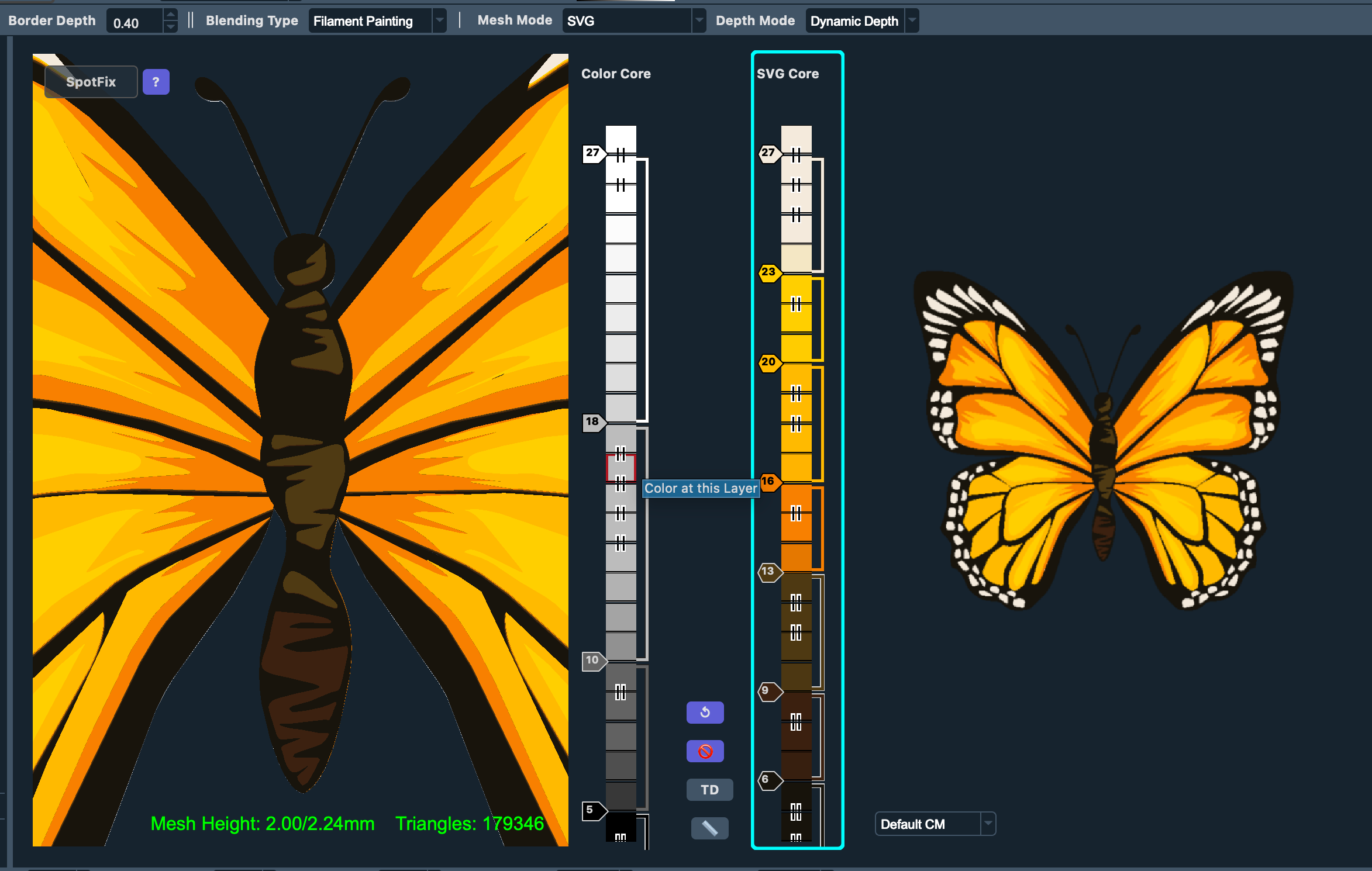
There will be at least two new Mesh Modes in 0.9.5 with SVG Mode being one of them. The other modes are, in my opinion, a bigger deal than SVG mode. However, there are going to be a lot of usability issues to deal with. I think 0.9.5 is likely a September/October beta release and will need a lot of UI feedback.
Meanwhile, if you’ve gotten this far, stay tuned. I will have another announcement later this week that I think you will love. I’ll just leave this as a hint.